a refreshing talk
http://www.youtube.com/watch?v=ke7SfUFvvxo
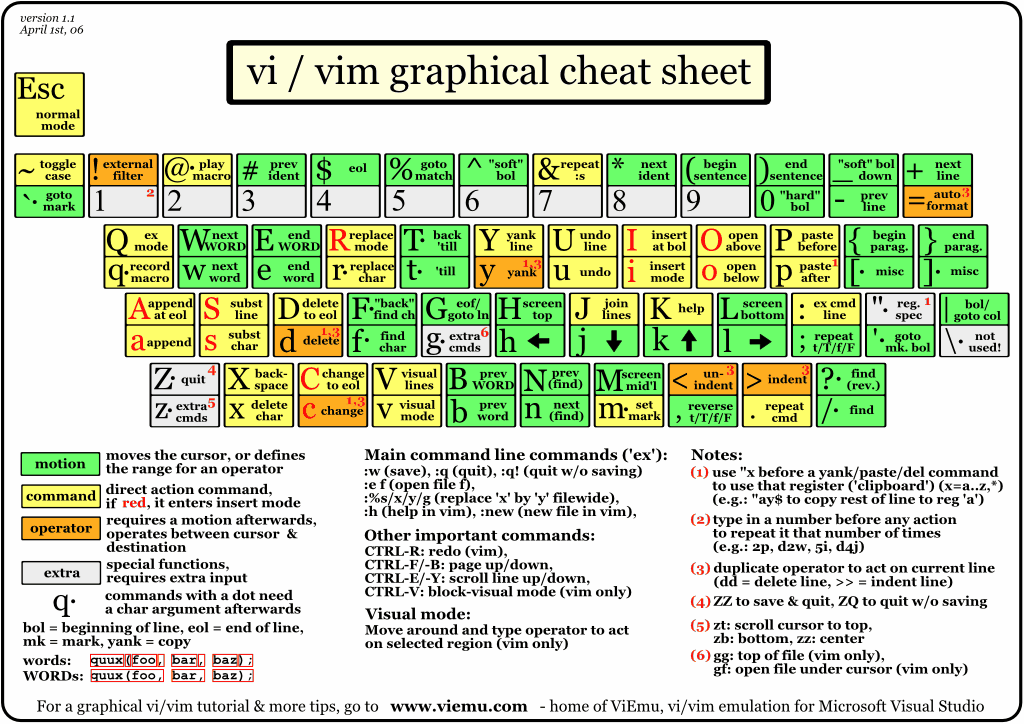
The cheat sheet
http://www.viemu.com/vi-vim-cheat-sheet.gif
one way to comment the code
(in addition to :n,ms/^/# where n starting line, m last line)
http://hurley.wordpress.com/2007/06/13/vim-tip-comment-out-multiple-lines/
The other way is Tcomment plug-in
top vim plugins
http://www.youtube.com/watch?v=_galFWwSDt0
my mapping to run python
map <F5> :!start ipython qtconsole --ConsoleWidget.font_family="Courier New" --ConsoleWidget.font_size=10 --c="run %"<CR><CR>
map <F6> :!start ipython -i %<CR><CR>
ctags wisdom
http://programming-in-linux.blogspot.com/2008/04/how-to-setup-taglist-plugin-with-vim.html
to check out
http://static.djangoproject.hu/vimpy/
http://stackoverflow.com/questions/6005874/opening-a-window-in-a-horizontal-split-of-a-vertical-split
Need to add resizing
" TaskList and NERDTree
function DualExplorer()
execute ":Tlist"
execute ":NERDTree"
execute ":wincmd J"
execute ":wincmd k"
execute ":wincmd l"
execute ":wincmd L"
endfunction
autocmd VimEnter * call DualExplorer()
Esc key for exiting insert mode - the big downside of vim. Recipes how to deal with it:
http://vim.wikia.com/wiki/VimTip285
This one probably the easiest solution.
:inoremap <CR> <Esc>
Remapping Caps Lock seems like a better choice, but takes extensive changes.
Something to look
http://www.leetless.de/vim.html

Given your F5 and F6 bindings, you should take a look at: vim-ipython
ReplyDeleteUsing this plugin, you can send lines or whole files for IPython to execute, and also get back object introspection and word completions in Vim, like what you get with: object?<enter> and object.<tab> in IPython.
As for escape - bind caps to another control, and use Ctrl-[