Saturday, January 21, 2012

Saturday, January 7, 2012
Tuesday, December 13, 2011
Accessing SQL Server DB from R on Linux using RODBC package
First of all you'll need to install FreeTDS package.
It looks like there is no need to specify --with-unixodbc any more.
I would add only that I had to edit not
Threading = 1
CPTimeout =
CPReuse =
FileUsage = 1
Threading = 1
CPTimeout =
CPReuse =
FileUsage = 1
Here is a sample code:
brew updatebrew install unixodbcbrew install freetdsIt looks like there is no need to specify --with-unixodbc any more.
I would add only that I had to edit not
/etc/odbcinst.ini
but
/usr/local/etc/odbcinst.ini,
On Linux it looks like this[FreeTDS]Description = TDS driver (Sybase/MS SQL)Driver = /usr/lib/odbc/libtdsodbc.soSetup = /usr/lib/odbc/libtdsS.soThreading = 1
CPTimeout =
CPReuse =
FileUsage = 1
On Mac paths are a bit different[FreeTDS]Description = TDS driver (Sybase/MS SQL)Driver = /usr/local/lib/libtdsodbc.soSetup = /usr/local/lib/libtdsS.soThreading = 1
CPTimeout =
CPReuse =
FileUsage = 1
Here is a sample code:
library(RODBC)
# replace server.name, database.name, user.id, password and T_my_table correspondingly
con <- odbcDriverConnect("DRIVER={FreeTDS};SERVER=server.name;DATABASE=database.name;UID=user.id;PWD=password;")
strSql <- "select * from T_my_table"
x <- sqlQuery(con, strSql)
close(con)
cat(x)
Friday, November 11, 2011
Friday, September 23, 2011
Grouping data.frame by column name pattern in R
This is kind of brutal force solution.
First you transpose the data.frame
Then use aggregate function
Finally transpose back.
An example...
x = data.frame(a1=rnorm(10), a2=rnorm(10), b1=rnorm(10), b2=rnorm(10))

g=sapply(colnames(x), function(xx) {strsplit(xx,split='')[[1]][1]})

y = t(aggregate(t(x),by=list(g),mean, simplify=T))

yy = data.frame(y[-1,])

colnames(yy) = y[1,]

rownames(yy) = rownames(x)
Thursday, September 22, 2011
sorting in python by arbitrary key
E.g. we have a list of dictionaries
sorts it by value at the 'b' key
x = [{'a':1,'b':3}, {'a':3,'b':2}, {'a':2,'b':1}]

x.sort(key=lambda i: i['b'])
sorts it by value at the 'b' key
How to use grep to search within a particular file type
Example
finding sort in python files.
3 options:
grep -r --include=*.py "sort" /home/vlad/work
find . -name "*.py" -print0 | xargs -0 grep "sort"
findstr /pinsc:"sort" *.py
Tuesday, September 6, 2011
setting up Notepad++ on Win7
In case I forget where the settings are:
C:\Users\MY_NAME\AppData\Roaming\Notepad++
Running IPython
ipython qtconsole --pylab=inline --ConsoleWidget.font_family="Courier New" --ConsoleWidget.font_size=10 --c="run $(FULL_CURRENT_PATH)"
Monday, September 5, 2011
mastering VIM
a refreshing talk
http://www.youtube.com/watch?v=ke7SfUFvvxo
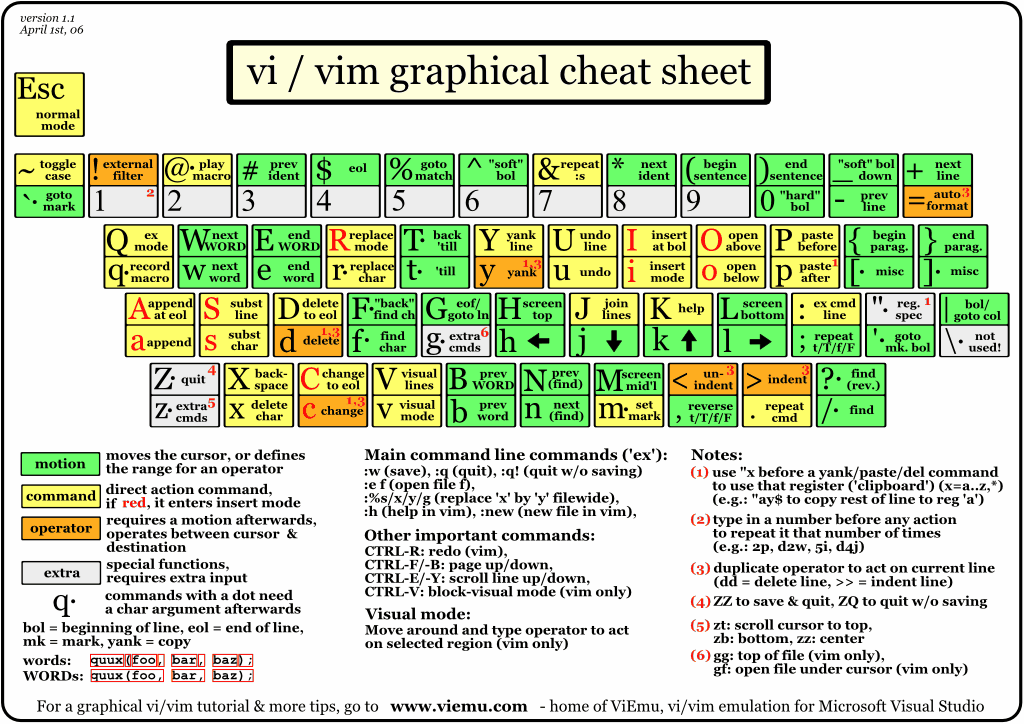
The cheat sheet
http://www.viemu.com/vi-vim-cheat-sheet.gif
one way to comment the code
(in addition to :n,ms/^/# where n starting line, m last line)
http://hurley.wordpress.com/2007/06/13/vim-tip-comment-out-multiple-lines/
The other way is Tcomment plug-in
top vim plugins
http://www.youtube.com/watch?v=_galFWwSDt0
my mapping to run python
map <F5> :!start ipython qtconsole --ConsoleWidget.font_family="Courier New" --ConsoleWidget.font_size=10 --c="run %"<CR><CR>
map <F6> :!start ipython -i %<CR><CR>
ctags wisdom
http://programming-in-linux.blogspot.com/2008/04/how-to-setup-taglist-plugin-with-vim.html
to check out
http://static.djangoproject.hu/vimpy/
http://stackoverflow.com/questions/6005874/opening-a-window-in-a-horizontal-split-of-a-vertical-split
Need to add resizing
" TaskList and NERDTree
function DualExplorer()
execute ":Tlist"
execute ":NERDTree"
execute ":wincmd J"
execute ":wincmd k"
execute ":wincmd l"
execute ":wincmd L"
endfunction
autocmd VimEnter * call DualExplorer()
Esc key for exiting insert mode - the big downside of vim. Recipes how to deal with it:
http://vim.wikia.com/wiki/VimTip285
This one probably the easiest solution.
:inoremap <CR> <Esc>
Remapping Caps Lock seems like a better choice, but takes extensive changes.
Something to look
http://www.leetless.de/vim.html
http://www.youtube.com/watch?v=ke7SfUFvvxo
The cheat sheet
http://www.viemu.com/vi-vim-cheat-sheet.gif
one way to comment the code
(in addition to :n,ms/^/# where n starting line, m last line)
http://hurley.wordpress.com/2007/06/13/vim-tip-comment-out-multiple-lines/
The other way is Tcomment plug-in
top vim plugins
http://www.youtube.com/watch?v=_galFWwSDt0
my mapping to run python
map <F5> :!start ipython qtconsole --ConsoleWidget.font_family="Courier New" --ConsoleWidget.font_size=10 --c="run %"<CR><CR>
map <F6> :!start ipython -i %<CR><CR>
ctags wisdom
http://programming-in-linux.blogspot.com/2008/04/how-to-setup-taglist-plugin-with-vim.html
to check out
http://static.djangoproject.hu/vimpy/
http://stackoverflow.com/questions/6005874/opening-a-window-in-a-horizontal-split-of-a-vertical-split
Need to add resizing
" TaskList and NERDTree
function DualExplorer()
execute ":Tlist"
execute ":NERDTree"
execute ":wincmd J"
execute ":wincmd k"
execute ":wincmd l"
execute ":wincmd L"
endfunction
autocmd VimEnter * call DualExplorer()
Esc key for exiting insert mode - the big downside of vim. Recipes how to deal with it:
http://vim.wikia.com/wiki/VimTip285
This one probably the easiest solution.
:inoremap <CR> <Esc>
Remapping Caps Lock seems like a better choice, but takes extensive changes.
Something to look
http://www.leetless.de/vim.html
Thursday, August 18, 2011
Thursday, August 4, 2011
Installing ImageMagick on Ubuntu 10.10
Dowload from here
ftp://ftp.imagemagick.org/pub/ImageMagick/
Refs:
http://ubuntuguide.net/install-imagemagick-in-ubuntu-linux
http://www.imagemagick.org/discourse-server/viewtopic.php?f=3&t=17059
ftp://ftp.imagemagick.org/pub/ImageMagick/
tar xvfz ImageMagick-6.5.3-10.tar.gzcd ImageMagick-6.5.3-10/./configuremakesudo make installldconfig /usr/local/libRefs:
http://ubuntuguide.net/install-imagemagick-in-ubuntu-linux
http://www.imagemagick.org/discourse-server/viewtopic.php?f=3&t=17059
Subscribe to:
Posts (Atom)